If you’ve shopped for a smart bulb, a lock, or a security camera any time in the last few years, you already know the old headache: one app for the lights, another for the thermostat, a third for the doorbell, and none of them talking to each other. Smart home trends 2026 are finally putting that mess to rest. This year isn’t about flashy new gadgets — it’s about three quieter shifts that actually make a connected house work the way it was always supposed to: a maturing Matter 1.3 standard that lets devices from different brands cooperate, local AI hubs that think for themselves instead of phoning the cloud, and a new wave of secure automation built to stop your house from being hijacked by a stranger with a laptop. If you’re planning an upgrade this year, understanding these three pillars will save you money, frustration, and more than a few 2 a.m. false alarms.
In this guide, we’ll walk through what’s actually changed, what it means for your day-to-day routines, and how to shop smart in a market that finally rewards interoperability over brand loyalty.
What’s Actually Different About Smart Homes in 2026
For years, “smart home” mostly meant a pile of gadgets that were smart individually but dumb together. A 2026 smart home behaves more like a single coordinated system. Three forces are driving that shift:
- A more mature Matter standard that closes long-standing gaps in appliances, energy devices, and cameras.
- On-device AI that can recognize context — a package at the door versus a stranger lingering — without shipping video to a data center.
- Automation platforms that treat security as a feature, not an afterthought, with stricter device verification and tamper-resistant routines.
None of these trends are entirely new. What’s new is that they’ve converged into something reliable enough for ordinary households, not just hobbyists. If you’re still weighing whether a full smart ecosystem is worth it, our beginner’s guide to whole-home automation breaks down the real costs and benefits before you buy a single device.
Matter 1.3 and Beyond: The Interoperability Backbone
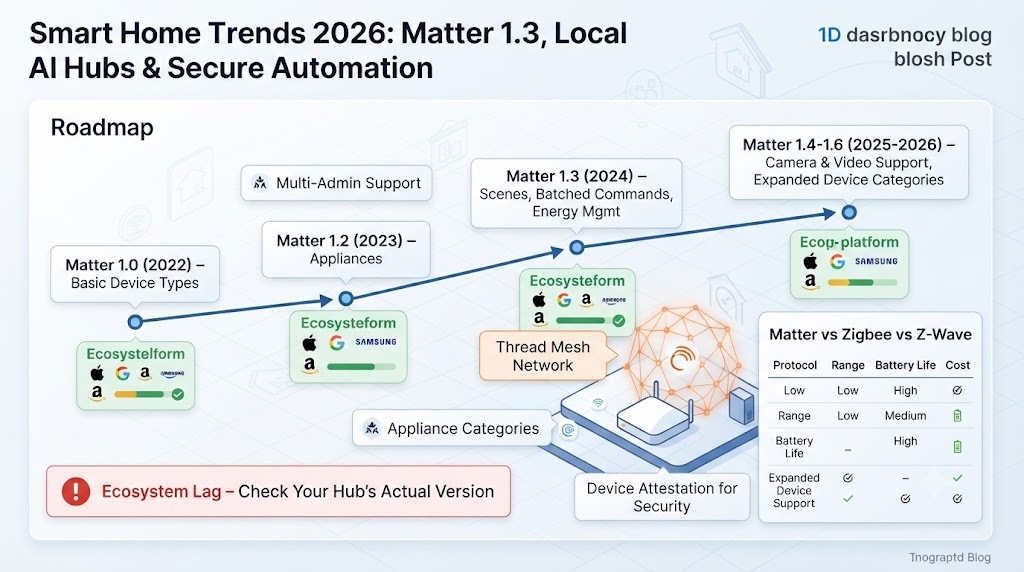
Matter, the cross-brand connectivity standard backed by Apple, Google, Amazon, Samsung, and hundreds of other manufacturers, was always meant to be a “digital Rosetta Stone” for the smart home. Matter 1.3 was the release that made that promise credible, and the versions that followed it through 2026 kept building on the same foundation.
What Matter 1.3 Actually Added
The Matter 1.3 update introduced Scenes, which let a single command set multiple devices — lights, blinds, thermostats — to a coordinated state at once, and batched commands, which reduce the lag between triggering an automation and seeing it happen across several devices simultaneously. It also expanded support into appliance categories that had been stuck outside the ecosystem, including laundry dryers, water heaters, and basic energy-reporting devices, plus new device attestation rules that make it harder for an unverified device to sneak onto your network.
Why It Matters for Your Home Right Now
Practically speaking, Matter 1.3 (and the 1.4, 1.5, and 1.6 updates that arrived through 2026) means:
- A lock, thermostat, or sensor bought today is far less likely to be orphaned by a discontinued app.
- Multi-admin support lets you and a partner control the same lock from different ecosystems — one on Apple Home, one on Google Home — without conflict.
- Energy management devices can now report real-time usage, which pairs nicely with utility rebate programs that require occupancy and consumption data.
If you’re trying to decide between Matter, Zigbee, and Z-Wave for a new install, our detailed Matter vs. Zigbee vs. Z-Wave comparison walks through range, battery life, and cost trade-offs in plain language.
The Catch: Ecosystem Lag
Not every platform implements every Matter feature at the same pace. Some ecosystems were still working through Matter 1.2 or 1.3 support well into 2026, even as the specification moved on to 1.5 and 1.6. Before buying a Matter-labeled device, it’s worth checking which specific version your hub or app actually supports — the badge on the box guarantees a common language, not that every feature will show up in your app on day one. Our step-by-step Matter device setup walkthrough covers exactly how to verify compatibility before you commission a new device.
Local AI Hubs: Intelligence That Stays Home
The second defining trend of 2026 is the shift away from cloud-only processing. A local AI hub — a compact device with enough on-board processing power to run real-time models — has become the intelligence layer for modern automation, handling pattern recognition, voice commands, and decision-making without shipping raw footage or audio to a remote server.
How Local AI Hubs Work
Instead of streaming a security camera feed to the cloud for analysis, a local AI hub processes the video right at home, using an on-device neural processing unit (NPU) to tell the difference between a delivery driver, a pet, and someone testing your door handle. The hub sends you a meaningful alert — not just “motion detected,” but “package delivered” or “unfamiliar person at the front door” — and none of the raw footage has to leave your network to make that judgment call.
This local-first approach to AI in the home shows up across categories:
- Security cameras that detect intent, not just movement, and store footage locally instead of in a subscription-gated cloud.
- Thermostats that learn a household’s rhythm and predict heating or cooling needs instead of reacting after the fact.
- Voice assistants that respond in a few hundred milliseconds because there’s no round trip to a data center.
- Presence sensors using radar or Wi-Fi signal changes to detect a person in a room without a camera at all, which is a genuine privacy upgrade for bedrooms and bathrooms.
If privacy is your main motivation for going local, our guide to privacy-first smart home devices lists specific hubs and cameras that keep data on-device by design, not just by marketing claim.
Why Local Processing Is Winning
Two practical benefits explain the shift. First, latency: a command processed on your own network responds in milliseconds rather than the one-to-three seconds typical of cloud round trips, and that difference is very noticeable with voice control and security alerts. Second, resilience and privacy: a local AI hub keeps working when your internet connection drops, and because sensitive data like camera footage or voice recordings doesn’t leave the house by default, it sidesteps a lot of the anxiety people understandably feel about always-listening devices. It also helps manufacturers meet tightening data protection rules, since personally identifiable information can stay on the device rather than in a server farm somewhere.
That said, local AI hubs aren’t a total replacement for the cloud. Firmware updates, remote access when you’re away, and long-term model improvements typically still rely on some cloud connectivity — the difference in 2026 is that the sensitive processing, the part that actually sees or hears you, increasingly happens at home. For a deeper technical breakdown, see our explainer on edge AI versus cloud AI in home automation.
Secure Automation: Why Trust Is the New Feature
The third pillar of smart home trends 2026 is the least glamorous and arguably the most important: secure automation. As more of the home runs on autopilot — doors that unlock themselves, lights that respond to presence, routines that arm and disarm security systems — the attack surface for something going wrong has grown right along with the convenience.
What “Secure Automation” Actually Means in Practice
A secure automation isn’t just one that uses encryption. It’s a system designed around a few core principles that 2026-era platforms and the latest Matter specification both lean into heavily:
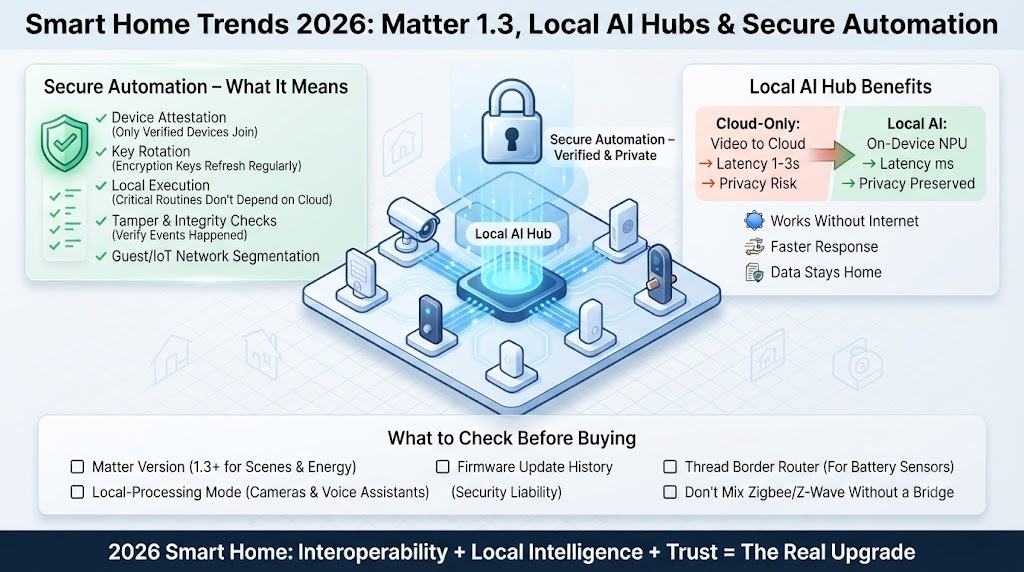
- Stricter device attestation — only cryptographically verified devices are allowed to join the network and issue commands, which closes the door on spoofed or cloned devices pretending to be your thermostat or lock.
- Predictable key rotation — encryption keys refresh on a schedule instead of staying static for years, shrinking the window in which a stolen key is useful to an attacker.
- Local execution of critical routines — a door lock or alarm shouldn’t depend on a distant server being online to behave correctly; local-first automation avoids the classic failure mode where a cloud outage leaves your front door unlocked.
- Tamper and integrity checks — automations that verify an event actually happened (a door genuinely opened) rather than trusting a single unverified signal that could be faked or replayed.
Practical Steps for a Safer Setup
You don’t need to be a security engineer to benefit from these improvements, but a few habits go a long way:
- Keep firmware updated on hubs, routers, and cameras — most vulnerabilities in 2026-era smart homes are patched issues that simply weren’t installed.
- Use a dedicated guest or IoT network segment so a compromised smart plug can’t see your laptop or phone.
- Favor devices with local storage options for camera footage over cloud-only subscriptions, both for privacy and for resilience during outages.
- Review which automations can unlock doors, disarm alarms, or unlock accounts, and require a second factor (a PIN, a biometric check) for the highest-risk ones.
For a full checklist, our article on securing your home network for IoT devices goes through router settings, VLANs, and firmware hygiene step by step. And if you’re specifically worried about camera and doorbell privacy, our piece on smart camera privacy settings you should change today is worth ten minutes of your time.
How Matter, Local AI, and Secure Automation Work Together
These three trends aren’t separate — they reinforce each other. Matter 1.3 and its successors give devices a common, verifiable language and a way to prove they’re legitimate. Local AI hubs use that verified data to make fast, private decisions without needing a cloud server as a middleman. And secure automation ties the two together with attestation and encryption so that the “smart” part of your home can’t be tricked into working against you.
Picture a realistic 2026 scenario: a Matter-certified door sensor reports an open door, a local AI hub on your network instantly cross-references it with a camera feed to confirm a person is actually present (not a gust of wind), and a secure automation rule — verified end to end, running locally — decides whether to send an alert, turn on lights, or do nothing at all. None of that requires your data to leave the house, and none of it depends on a distant server being awake at 2 a.m. That’s the practical payoff of 2026’s smart home trends: less magic-feeling but unreliable automation, more automation you can actually trust. Our complete smart home automation playbook shows how to chain these kinds of routines together for your own house.
Choosing Devices That Fit the 2026 Standard
A few practical buying guidelines will save you from expensive mistakes:
- Check the specific Matter version, not just the logo. A device certified for Matter 1.3 or later will support Scenes and improved appliance categories that older Matter 1.0/1.1 devices lack.
- Look for a stated local-processing mode, especially for cameras and voice assistants, if privacy and offline reliability matter to you.
- Confirm the manufacturer’s firmware update history. Devices with a poor track record of updates are a security liability regardless of what standard they claim to support.
- Prioritize a proper Thread border router if you’re buying battery-powered sensors or locks — it meaningfully improves range and reliability over Wi-Fi-only setups.
- Don’t mix legacy Zigbee or Z-Wave devices into a Matter network without a bridge — treat them as a separate layer until you’re ready to replace them.
If you’re building a system from scratch, our best smart home starter kits for 2026 rounds up combinations that already meet these criteria out of the box.
Common Mistakes Homeowners Still Make
- Assuming “Matter compatible” means every feature works with every app. Ecosystem support still lags the specification.
- Buying a cheap hub without checking for local-processing options, then being surprised by a mandatory cloud subscription later.
- Skipping network segmentation, which turns one compromised smart plug into a doorway to the rest of the home network.
- Overloading a single Thread network past its practical device limits, causing flaky performance in larger homes.
- Ignoring firmware update settings, leaving known vulnerabilities unpatched for months.
The Road Ahead
Expect the pace of practical improvement to keep accelerating rather than slowing down. Camera and video support, which arrived in later Matter releases, is still catching up across major ecosystems, and appliance categories like robot vacuums and full kitchen devices are next in line. On the AI side, hubs are moving from simple pattern recognition toward genuinely contextual understanding — telling the difference between a delayed delivery and an intruder, or between a pet and a toddler near a pool. And on security, expect device attestation and local-first execution to become baseline expectations rather than premium features. The smart home in 2026 isn’t trying to dazzle you with novelty; it’s finally trying to earn your trust.
Frequently Asked Questions
1. What is Matter 1.3 and why does it matter for my smart home? Matter 1.3 is an update to the Matter smart home standard that added Scenes, batched commands, new appliance device types like laundry dryers and water heaters, and stronger device verification. It matters because it makes devices from different brands cooperate more smoothly and closes gaps left by earlier Matter versions.
2. Do I need to replace all my existing smart home devices to use Matter 1.3? No. Matter is backward compatible, so Matter 1.0 and 1.1 devices continue working alongside newer Matter 1.3+ devices. You only need to check compatibility if you want features specific to the newer version, like Scenes or new appliance categories.
3. What exactly is a local AI hub? A local AI hub is a smart home device with enough on-board processing power to run AI models directly, rather than sending data to the cloud for analysis. It can recognize patterns, interpret camera footage, and manage automations entirely on your home network.
4. Are local AI hubs more private than cloud-based smart home systems? Generally, yes. Because sensitive data like video and voice recordings is processed on the device itself, less of it needs to leave your home network, which reduces exposure in the event of a data breach and limits what any single company can collect about your household.
5. Will a local AI hub still work if my internet goes down? Core functions usually keep working, since the processing happens locally. Features that depend on remote access, such as checking your cameras from outside the house, will still require an internet connection.
6. What does “secure automation” mean in a smart home context? Secure automation refers to smart home routines built with device verification, encrypted and regularly rotated keys, local execution of critical actions, and integrity checks to prevent spoofed or tampered commands from triggering things like unlocking a door.
7. Is Matter safe to use for smart locks and security devices? Matter’s more recent specifications, including 1.3 and later, added stricter device attestation and key rotation specifically to make critical devices like locks safer. As with any connected device, keeping firmware updated and using a segmented network adds an extra layer of protection.
8. How is Thread different from Matter? Matter is an application-layer standard that defines how devices talk to each other and to your apps. Thread is a low-power wireless mesh network that many battery-powered Matter devices, like sensors and locks, use to connect. Matter can also run over Wi-Fi or Ethernet, so not every Matter device needs Thread.
9. Do I need a Thread border router for a Matter smart home? Only if you’re using Thread-based devices, which is common for battery-powered sensors and locks. Many modern smart speakers, routers, and TVs already function as Thread border routers without you realizing it.
10. What smart home devices should I prioritize upgrading first in 2026? Start with the devices most tied to security and daily routines: your hub or controller, door locks, and cameras. These benefit most from Matter’s improved attestation, local AI’s faster and more private processing, and secure automation’s tamper protection.
11. Can I mix Zigbee, Z-Wave, and Matter devices in the same smart home? Yes, but it’s best to treat them as separate layers connected through a bridge or multi-protocol hub rather than assuming they’ll interoperate natively. Mixing protocols without a bridge is one of the most common setup mistakes.
12. How much does it cost to build a Matter-based smart home with local AI in 2026? Costs scale widely, from a few hundred dollars for a basic starter kit covering lights and a hub, to several thousand dollars for a fully integrated system with local AI cameras, energy management, and whole-home automation. Matter’s interoperability makes it easier to build the system gradually without fear of incompatible devices later.
Smart home trends 2026 boil down to a simple idea: the industry finally stopped chasing new gadgets and started fixing the plumbing — interoperability through Matter 1.3 and beyond, intelligence that stays local through AI hubs, and automation you can actually trust through stronger security design. Whether you’re starting from scratch or upgrading a patchwork system, aligning your next purchase with these three trends will make your home smarter, faster, and considerably harder to compromise.