Smart art frames sell a lovely idea: a screen that behaves like a painting when you aren’t watching anything, so the biggest blank rectangle in your living room stops being a black hole. I like the idea. I also think most buying guides skip the part that matters most, which is what the thing costs you once you add the frame, the subscription, the electricity and the wiring. A sticker price of $900 can turn into something closer to $1,600 over three years, and two products that look identical on a shop floor can end up several hundred dollars apart.
This guide treats smart art frames the way a careful buyer would. We’ll separate the two product families that get lumped together, compare the main contenders, run a three-year cost of ownership with the assumptions written out, and then deal with the interior-design side that rarely gets covered: where to hang one, how to stop glare, and what to plan in the wall before the plasterer arrives. If you’re planning a build or renovation and want these details handled early, that’s the kind of coordination our team does through Archtra’s architecture and interior design services.
Table of Contents
- What Are Smart Art Frames?
- How They Actually Work
- Art TV vs Digital Canvas
- The Main Contenders in 2026
- What You Really Pay: A Three-Year Cost of Ownership
- The Subscription Question
- Electricity: How to Work Out Your Own Number
- Where to Put Smart Art Frames
- Plan the Wall Before You Buy
- Who Should Buy One (and Who Shouldn’t)
- Mistakes to Avoid
- How to Choose, Step by Step
- Frequently Asked Questions
What Are Smart Art Frames?
Smart art frames are screens designed to display artwork or photographs convincingly when they’re not being used as a television or media display. Most have a matte, low-reflection panel so the image looks printed rather than lit, sensors that adjust brightness to the room, and a built-in library or an upload option for your own pictures.
The label covers two quite different families:
- Art TVs. Full televisions that switch into an “art mode.” Samsung’s The Frame is the best known, with rivals from Hisense, TCL, LG and Amazon. They start at around 50 inches and cost real money.
- Digital canvases and picture frames. Smaller, art-only screens, typically in the 20 to 30 inch range, with no TV function. Netgear’s Meural Canvas is the classic example, sitting in a roughly $300 class according to 2026 comparisons.
Mixing these two up is the most common buying mistake. They solve different problems, which the table further down makes clearer.
How They Actually Work
The magic in smart art frames is mostly in the panel and the software, not the frame itself.
- A matte display. Ordinary TVs are glossy and mirror your room. Art TVs use anti-glare or “hi-matte” coatings so the picture reads more like paper or canvas.
- Art mode. When the TV is off, or you tell it to, it shows artwork. Samsung says art mode draws roughly 30% of the power the same set uses in normal TV mode.
- Sensors. A motion sensor can switch the screen off when the room is empty, and a light sensor adjusts brightness and colour tone so the image doesn’t glow in the evening.
- Digital mats and bezels. Software adds a virtual mount around the artwork. A physical bezel (the “frame”) is usually a snap-on or magnetic accessory.
- A flush mount and tidy cabling. Most come with a slim wall mount that sits close to the wall, and on Samsung models a thin cable runs to a separate connection box that you can hide away from the screen.
Art TV vs Digital Canvas
| Art TV (Samsung Frame, Hisense CanvasTV, etc.) | Digital canvas (Meural-style) | |
|---|---|---|
| Main job | A TV that doubles as art | Art only |
| Typical size | About 43 to 85 inches and larger | About 20 to 30 inches |
| Typical price | From roughly $650 to $2,500+ | Roughly $300 class |
| Streaming and apps | Yes | No |
| Best for | Living rooms where you’d buy a TV anyway | Hallways, studies, gallery walls |
| Space needed | A large, dedicated wall | A normal picture position |
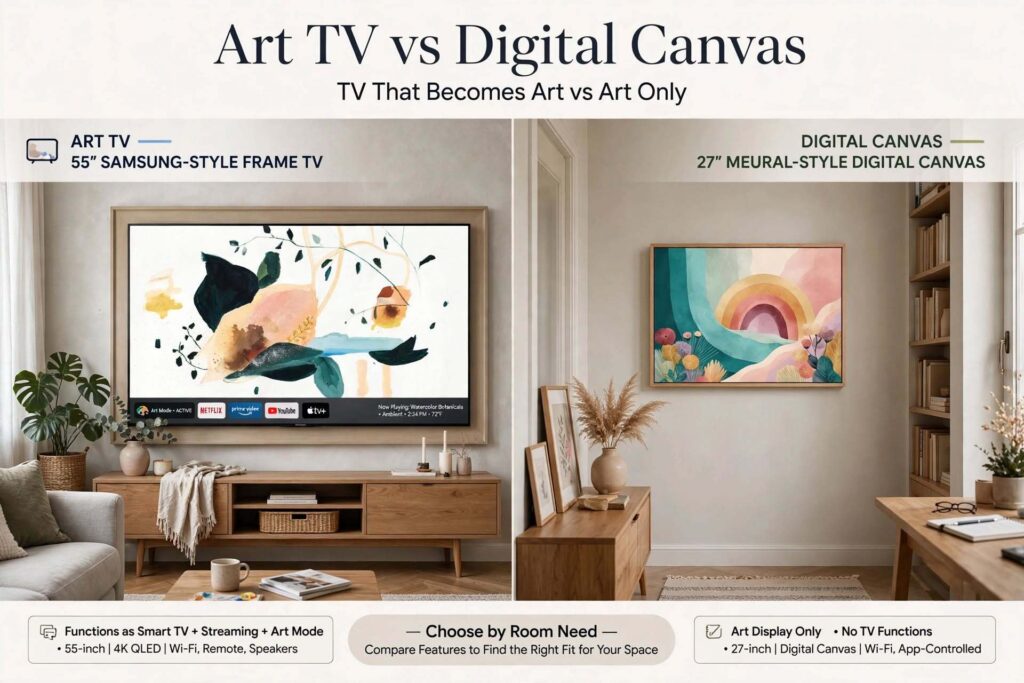
My rule of thumb for smart art frames: if the room needs a television, an art TV is a clever upgrade. If it doesn’t, an art TV is an expensive way to hang a picture, and a smaller digital canvas is usually the saner call.
The Main Contenders in 2026
Prices move constantly, with frequent sales, so read these as ballparks and check the current number before you buy.
Samsung The Frame and The Frame Pro. The category’s reference product. The 2026 standard Frame lists at about $1,200 for 55 inches in several comparisons, though 2025 stock and sales pull that lower, and the Pro (a Neo QLED model) climbs well past $1,600 at 65 inches. It offers the largest art library and the most polish, and it’s the only one here with a long-running art subscription.
Hisense CanvasTV. The value pick in most 2026 reviews. A wooden frame is included in the box, and the roughly 1,000-plus work art library needs no subscription. Prices run from about $650 to $900 for the smaller sizes, with larger models costing more. Reviewers generally rate Samsung’s picture quality and reflection handling slightly higher, while Hisense is stronger on value and gaming features.
TCL, LG and Amazon. TCL’s art TVs and its A400U Designer Series, LG’s Gallery TV with a frame, and Amazon’s Ember Artline all compete here. The Amazon and TCL options are positioned as subscription-free, and some reviewers favour TCL’s picture quality at the price.
Digital canvases. If you only want art on a wall, Netgear’s Meural Canvas II and similar frames cost a fraction of an art TV and fit a normal picture position.
What You Really Pay: A Three-Year Cost of Ownership
Here’s the part I wish more guides on smart art frames did. Hardware is only the first line. Below is an illustrative three-year comparison for a 55-inch model in US dollars, with the assumptions stated so you can swap in your own numbers.
| Cost line (3 years) | Samsung The Frame 55″ | Hisense CanvasTV 55″ |
|---|---|---|
| Hardware (typical list/street) | about $1,200 | about $900 |
| Frame / bezel | about $175 (accessory, $150 to $200) | $0 (included) |
| Art subscription | about $150 (at $49.99/yr, if you keep it) | $0 |
| Electricity | about $98 | about $98 |
| Illustrative total | about $1,620 | about $1,000 |
Assumptions: 50 W average draw, 12 hours a day in art mode, a $0.15 per kWh tariff, three years of use. Sales can cut the Samsung’s hardware price by hundreds, and several comparisons found a gap of roughly $600 over three years between the two once everything is counted. The ranking can flip on a good deal, which is exactly why you should price the whole bundle, not the headline.
Two honest caveats. First, the Samsung’s better contrast and reflection handling are real, and some people will happily pay for them. Second, you can skip the subscription entirely (more below), which closes part of the gap.
The Subscription Question
Samsung’s Art Store is the thing people forget to budget. It costs $4.99 a month or $49.99 a year, and gives access to a library that runs into the thousands of works. Without it you get a small free selection, and you can still upload your own photos or artwork at no cost. Hisense includes a library of more than 1,000 works with no subscription, though it has no equivalent of Samsung’s store.
My view: pay for the subscription only if you’ll genuinely rotate art. If you plan to load a handful of favourite images and leave them, the free route is fine. A subscription you forget about is a quiet drain, and over five years it adds about $250.
Electricity: How to Work Out Your Own Number
Smart art frames are effectively always on, so power matters more than with a normal TV. Samsung states art mode uses about 30% of normal TV power, and independent write-ups put a 65-inch Frame at roughly 50 W in a typically lit room, which works out to about $15 to $35 a year depending on tariff and hours. Brighter rooms push the number up because the panel works harder against ambient light.
Use this formula for your own home:
Watts × hours per day × 365 ÷ 1,000 × your price per kWh = annual cost
Example: 50 W × 12 h × 365 ÷ 1,000 = 219 kWh. At $0.15 per kWh that’s about $33 a year. Use your local tariff and your real hours. Setting the motion sensor so the screen switches off when nobody’s home is the easiest saving, and some people schedule it off overnight.
Where to Put Smart Art Frames
This is where an interior designer earns their fee, because a screen is far less forgiving than a print.
- Hang at gallery height. The usual guideline is to centre the artwork around 145 cm (57 inches) from the floor, so it sits at eye level. Smart art frames get hung too high above fireplaces more than anything else.
- Mind the glare. Matte panels help, but a window directly opposite or a bright downlight aimed at the screen will still wash it out. Place the frame at right angles to windows where you can.
- Choose the wall colour deliberately. A frame against a deep, matte wall looks richer than against a stark white one. Warm neutrals tend to flatter classic paintings.
- Treat smart art frames as one piece in a collected wall. Pair it with real prints and objects rather than leaving it alone, which is also the philosophy behind modern heritage design.
- Match the art to the room. Textured, calm imagery sits well with the tactile textures trend, while quiet, uncluttered pieces suit Japandi style.
- Room by room. A living room suits a large art TV. A study or hallway often suits a smaller digital canvas. A bedroom is usually better without a bright screen at all, or with a small frame on a dim setting.
Our guide to interior design styles can help you choose imagery that fits the rest of the room.

Plan the Wall Before You Buy
This is the section nearly every competitor skips, and it’s where the best results come from. A smart art frame looks properly integrated only when the wires disappear. If you’re building or renovating, plan these things early:
- Power at the right height. A socket directly behind the screen, ideally recessed, so there’s no cable trailing down the wall.
- Conduit for data and HDMI. An empty pipe from the wall position to a cabinet lets you swap cables later without cutting plaster.
- A recessed niche. A shallow recess lets a slim-mount screen sit almost flush, or even fully flush with the wall.
- A home for the connection box. Samsung-style models run a slim cable to a separate box, so you need a ventilated cabinet or shelf within reach.
- Strong wall fixing. Large screens are heavy, so confirm the wall can carry the load before the finishes go on.
- Lighting positions. Place downlights so they don’t reflect straight into the panel.
- Surge protection. If your power supply is unstable, a good surge protector is cheap insurance for an expensive screen.
None of this costs much for smart art frames when it’s done at the first-fix stage, and all of it costs a lot when it isn’t. Reading the electrical and elevation drawings is part of getting it right, and our guide on how to read architectural drawings will help. Whether you need an architect, an interior designer or both for this kind of coordination is covered in architect vs interior designer, and a wider budget view is in our interior design cost per sq ft guide.
Who Should Buy One (and Who Shouldn’t)
Buy one if you were going to buy a television anyway and dislike the black rectangle, you enjoy rotating art, or you want a flexible centrepiece for an open-plan living room.
Think twice if the room doesn’t need a TV, you’d leave it on one image forever, you’re on a tight budget (a print or a smaller digital canvas does the job), or your wall faces a large window with no way to control glare.
Mistakes to Avoid
- Comparing hardware prices only. Add the frame, any subscription, power and installation.
- Buying an art TV when you wanted a picture. A smaller digital canvas is often the better fit.
- Ignoring glare and sightlines. Check the wall at different times of day before you commit.
- Hanging it too high. Eye level beats “above the fireplace.”
- Leaving cables for later. Retrofitting is messy and expensive.
- Leaving it on 24 hours a day. Use the motion sensor and schedules.
- Assuming every model includes a frame. Some do, many don’t.
- Skipping the wider design plan. A screen is one element. Our list of common interior design mistakes covers the layout and lighting errors that undermine it.
How to Choose, Step by Step
- Decide whether the room needs a TV. If yes, look at art TVs. If no, look at digital canvases.
- Measure the wall and your viewing distance. Bigger isn’t automatically better.
- Set the full-bundle budget. Hardware, frame, subscription, electricity and installation.
- Check glare. Stand where the screen will go at midday and in the evening.
- Choose your art source. Own photos, a free library or a paid store.
- Plan power, data and fixing before the finishes go on.
- Compare a current price, not last year’s. Sales swing hard.
- Check warranty and return terms, especially for a large, delicate screen.
Frequently Asked Questions
1. What are smart art frames? They’re screens built to display artwork or photographs convincingly when you aren’t using them for viewing. They usually have matte, low-glare panels, brightness sensors and a built-in or uploaded art library. The category includes art TVs such as Samsung’s The Frame and smaller digital canvases that only show art.
2. Are smart art frames worth the money? It depends on the room. If you’d buy a TV anyway and dislike a black screen, an art TV can be a worthwhile upgrade. If you only want art on a wall, a smaller digital canvas or a good print costs far less. The full cost, not just the sticker price, is what to judge.
3. How much do smart art frames cost? Art TVs run from roughly $650 to $2,500 or more depending on brand, size and sales. Digital canvases sit around the $300 mark. Add a frame (about $150 to $200 for Samsung), any subscription and electricity, and a Samsung 55-inch can total roughly $1,600 over three years against about $1,000 for a comparable Hisense.
4. Do I need a subscription for smart art frames? Not always. Samsung’s Art Store costs $4.99 a month or $49.99 a year, but you can upload your own photos for free and use a small free selection. Hisense includes a library of more than 1,000 works with no subscription.
5. How much electricity do smart art frames use? Art mode typically draws about 30% of normal TV power, around 50 W for a 65-inch model in a normally lit room, which is roughly $15 to $35 a year depending on your tariff and hours. Use watts × hours × 365 ÷ 1,000 × your rate to work out your own number.
6. What’s the difference between The Frame and the Hisense CanvasTV? Samsung generally scores higher for picture quality, reflection handling and art library, and it has a premium bezel range. Hisense costs noticeably less, includes a wooden frame, and has no art subscription. Reviewers often describe the Hisense as delivering most of the experience for much less money.
7. Can I use my own photos and artwork? Yes. Most smart art frames let you upload your own images through an app or USB drive, usually without charge, and many let you add a digital mat around them.
8. Where is the best place to hang a smart art frame? Centre it at roughly eye level, about 145 cm (57 inches) from the floor, on a wall where windows and downlights won’t reflect straight into the screen. Living rooms suit large art TVs, while hallways and studies suit smaller digital canvases.
9. Can I install a smart art frame myself? Mounting smart art frames is straightforward for many people, but a neat result needs planning: a recessed socket, conduit for cables, a ventilated spot for any connection box and a wall that can carry the weight. If you’re renovating, it’s far cheaper to plan these before walls are finished, and a qualified electrician should handle any new wiring.
10. Do smart art frames work in humid climates or with unstable power? Smart art frames are ordinary electronics, so keep them out of damp, steamy spaces and away from direct sun and heat. If your power supply is unreliable, use a good surge protector, and always check the manufacturer’s warranty and environmental guidance for your region.
Final Thoughts
Smart art frames are at their best when you treat them as a design decision and a financial one. Decide whether you really need a TV, price the whole three-year bundle rather than the sticker, and plan the wall, the power and the lighting before the finishes go on. Do that and you’ll end up with something that looks effortless, which, as with most good design, is the result of a lot of quiet planning.
If you’d like help integrating screens, lighting and wiring into a new build or renovation, our team at Archtra can coordinate it from the first drawings. Browse our project portfolio and project gallery for examples, or get in touch with our design team to start planning your space.